
Download Tales Animator Pro – animation, storytelling, character, narrative, sound, text, lip sync, video export, creative tool, mobile app, Android, utility, productivity, smartphone, tool, user-friendly, easy to use, digital storytelling
Overview
Tales Animator Pro is a mobile application designed to empower users with limited animation experience to create compelling digital stories. Targeted at aspiring storytellers, educators, content creators, and students, the app provides a streamlined platform for crafting animated narratives without requiring advanced technical skills or programming knowledge. Its core purpose is to lower the barrier to entry in animation by offering intuitive tools that focus on creativity over complexity.
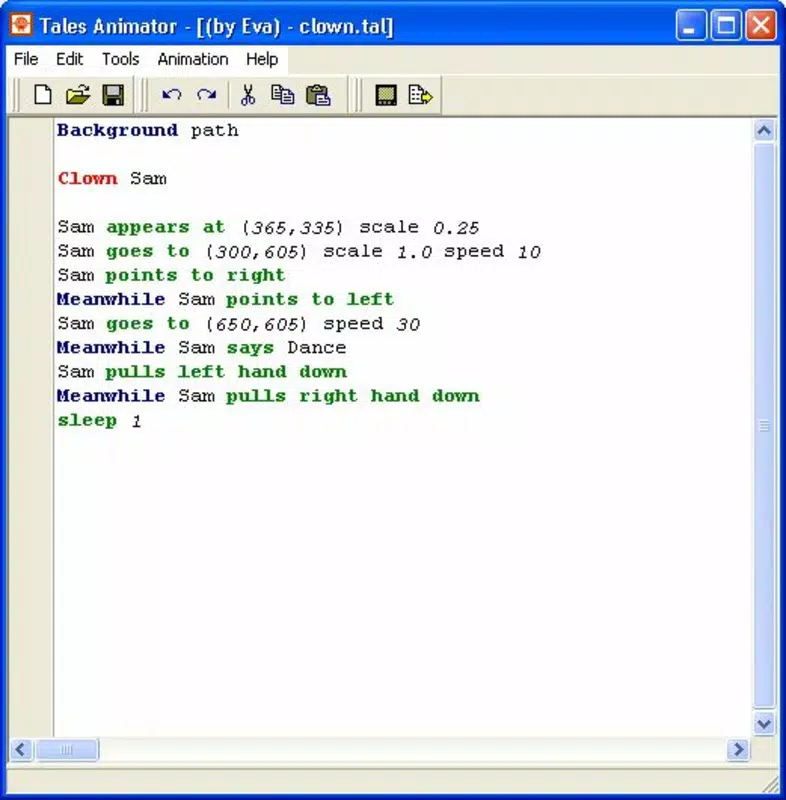
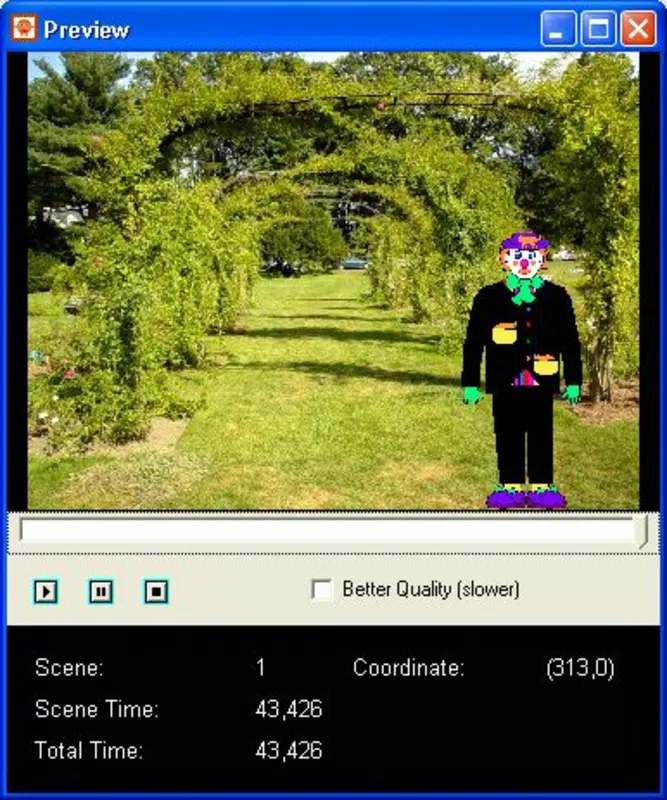
The app enables users to bring stories to life using a built-in library of characters, text overlays, and synchronized sound elements. By combining these components, users can produce engaging animations suitable for educational presentations, social media content, or personal creative projects. The ability to export final works as AVI files enhances its utility across various sharing platforms.
Although the developer did not provide additional background information, the app has been available since January 16, 2012, indicating a long-standing presence in the mobile productivity space. Its continued relevance suggests a stable foundation and consistent user value. Tales Animator Pro fits into the broader digital storytelling ecosystem by offering a lightweight, accessible tool for narrative expression on smartphones and tablets.
Real-world use cases include classroom storytelling activities, youth animation workshops, and independent creators producing short animated content for online audiences. The app’s focus on narrative structure and character-driven scenes makes it particularly useful for visual learners and creative expression in educational environments.
Key Features & Functionality
- User-Friendly Interface: The app features a clean, intuitive layout that allows users to navigate tools with minimal learning curve. This design enables both beginners and experienced users to focus on storytelling rather than mastering complex software mechanics.
- Built-In Character Library: A diverse collection of pre-designed characters is available for immediate use. These characters can be easily manipulated to match different story scenarios, eliminating the need for drawing or character creation skills.
- Automatic Lip Syncing: As dialogue appears in speech bubbles, the app automatically synchronizes mouth movements with the text. This feature enhances realism and reduces manual animation work, allowing creators to produce polished content faster.
- Integrated Sound Effects: A selection of sample sound effects is included to enrich animations. These can be layered with dialogue or background audio to create immersive storytelling experiences.
- Export Options: Completed animations can be exported as AVI files with customizable codec settings. This flexibility supports high-quality output suitable for sharing on multiple platforms.
For example, a teacher might use the app to create a short animated lesson where a character explains a math concept, with synchronized speech and sound cues. A student could develop a personal story about a fictional adventure using pre-made characters and voice-over text. The combination of automated lip syncing and export flexibility ensures that even simple projects feel professional.
Interface, UX & Performance
The user interface of Tales Animator Pro is designed with simplicity in mind, prioritizing accessibility over visual complexity. Navigation is linear and consistent, allowing users to move through animation creation stages—character selection, dialogue input, sound integration, and export—with minimal friction. The layout places key tools within easy reach, reducing the need for excessive menu diving.
Visual style is functional and minimal, focusing on clarity rather than ornamental design. This approach ensures that users remain focused on their creative process. The app maintains responsive interactions across different screen sizes, suggesting optimized performance for a range of Android devices.
Although the developer did not list formal performance metrics, the app’s lightweight file size of 24.6 MB indicates efficient resource usage. This suggests it runs smoothly on mid-range and older Android devices without excessive battery drain or memory strain. Stability appears to be maintained over time, supported by the app’s long-standing release history.
Users can expect consistent responsiveness during animation playback and editing, though no real-time preview or advanced rendering options are mentioned. Overall, the UX reflects a mature product focused on usability and reliability.
Platform Compatibility & Technical Requirements
Tales Animator Pro is available exclusively on the Android platform. The app supports Android operating systems, though specific minimum OS version requirements were not listed by the developer. This lack of detail may affect compatibility with very recent or legacy devices.
The current software version is 2.1, released on January 16, 2012. This version number suggests the app has undergone minimal updates over the years, which may reflect either stability or limited development activity. The app’s file size is 24.6 MB, indicating a compact footprint suitable for devices with limited storage space.
Given the age of the release date, users should verify compatibility with their current Android system. While the app may still function on modern devices, performance and feature support could vary. The developer did not specify whether the app is optimized for tablets or large-screen devices.
Pros and Cons
Pros
- Intuitive interface ideal for beginners and non-technical users
- Preloaded character library eliminates need for drawing skills
- Automatic lip syncing enhances realism with minimal effort
- Includes built-in sound effects for richer storytelling
- Supports AVI export with customizable codecs for sharing
- Lightweight size (24.6 MB) ensures compatibility with older devices
Cons
- App has not been updated since 2012; potential compatibility issues with modern Android versions
- No information on minimum OS requirements or device optimization
- Limited to AVI export format; no support for modern video codecs like MP4
- Does not support video import or advanced animation controls
- Developer background and support details were not provided
FAQ
Is Tales Animator Pro safe to download and install?
Yes, the app is available through official Android channels and has been in use since 2012. As long as it is downloaded from a trusted source, it is considered secure for personal use.
Can I use Tales Animator Pro on iOS devices?
No, the app is currently only available for Android. There is no official iOS version or support announced by the developer.
Does the app require an internet connection?
No, all core features—including character usage, lip syncing, sound integration, and export—can be used offline. No connectivity is needed during animation creation.
How do I update Tales Animator Pro?
Updates are managed through the Google Play Store. However, the app has not received any updates since its release in 2012, so no new version may be available.
What file formats can I export my animations in?
The app supports exporting animations as AVI files. No other formats such as MP4 or MOV are currently supported.
Final Thoughts + CTA
Tales Animator Pro stands as a unique tool in the mobile productivity space, offering a straightforward path to digital storytelling for users who lack formal animation training. Its emphasis on simplicity, built-in assets, and automated features like lip syncing make it a valuable utility for educators, students, and creative hobbyists. Despite its age and lack of recent updates, the app continues to serve its niche with a focused, functional design.
While modern alternatives may offer more advanced features and better compatibility, Tales Animator Pro remains a reliable choice for those seeking a lightweight, easy-to-use animation tool. Its low price point of $2.99 adds to its appeal as a budget-friendly creative solution.
For anyone looking to explore animation on Android without technical hurdles, this app delivers real value. Download Tales Animator Pro now


